


Industry Facing (for Major Project - Assignment 2)
- penspeare
- May 7, 2024
- 14 min read
Updated: May 14, 2024
(This blog post is part of a group for my Major Project assignment as part of my Masters in Animation. This is the Industry Facing post. Links to the other relevant blogs are under "Brother Blogs" under Navigation).
Preface
What industry are you targeting
How are you approaching it
Art and design flare to solve problems (artsy approach to CV; layout of style guide)
Nurture the way you present your work to both the public and the industry
Consider current trends (gothic revival)
Attention to detail is key - how and why are you promoting yourself? (my website)
Just quickly before we get stuck into the blog properly: for this assignment, there is a CV (submitted as a PDF separately), the style guide, and my website as a portfolio.
Added 28/09/2023
Notes from the Brief to consider throughout the blog posts and final products:
May consist of the following:
CV (must) - Word or PDF; 1 page, or 2 page max (more likely for academic)
Showreel or portfolio (or both) - can be built as a portfolio website. Portfolio no more than 20 images - this can also be the style guide
Reflective research blog (this)
Deadline for Part-time: (Tuesday 9th for [other]); Thursday 11th January 2024 at 5pm*
Between the deadline and degree show, it's totally fine to continue working on pieces in preparation for the show
*(Note: I received an extension to my (part-time) deadline to the 3rd week of May, the following marking period, after a family bereavement halfway through the module).
Research into industry practices for portfolios, look at existing portfolios and reels
Critical and insightful evaluation and really bring the argument together and being concise about it
Navigation
Table of Contents
Brother Blogs
Take me to the Major Project Plans blog
Take me to the Style Guide blog
Take me to the Visual Development blog
Lecture Notes
(Feel free to skim over these; I placed them here for my own convenience to refer back to to aid in researching and informing final pieces work; Wix doesn't have a feature where you can cut/copy and paste images within the blog)
(Skip to Industry Research)
(Take me back to Navigation)
Lecture 26/07/23
Career Planning
Understand the importance of ownership of your employability
Identify 4 stages of career action planning
Proactively develop skills and experience needed to attain employment goals
What is the industry looking for and how can I demonstrate this? Being analytical to this is a must, and you need to consider who else is out there and the competition - but also know your worth
Ensure soft skills are up to scratch, as well as your technical skills
Always consider the job requirements - apply anyway even if, for example, the job requirement states 2 years when you only have 1. If they like you and want your skills, they will take you
Explore Know yourself: values; interests; strengths; traits; ambitions What are your circumstances? The end goal? Are you willing to travel and how far? What motivates you? What are areas for you to improve on?
Plan Possibilities/Explore options: Occupational research; industry trends; career options for degree What can I do with my degree? Get focused: Action planning; goal setting; decision making
Act Specific M A R T
Sorted Proactive/Take action: Gain experience; job search tools - how you'll be searching for jobs; connect with employers Employability and careers; professional networks; personal networks; your own online research; social media
Branding
Marketing yourself - create your personal brand to promote yourself
What are your skills?
Your professional competencies?
Your target audience?
Your brand is what people say about you when you're not in the room ("Your brand name is only as good as your reputation" - Richard Branson (lol)) Consider:
How you're perceived upon first impressions
Your unique skills, knowledge, and experience
Your reputation = your brand, so be authentic
Your online presence affects your brand
When people first meet you, what do they think?
When people know you, what do they think?
When people work with you, what do they think? Once people get to know you, does the first impression hold up?
People's first impression of you are generally formed within the first 30 seconds f meeting you. Opinions can be hard to shake once they've been formed, but they aren't unchangeable, but a good first impression always helps
Look at your target audience
What do they want to see?
What skills are needed to work for/with them?
Think about your qualities/skills/abilities/experience
Match them together and provide evidence
Your reputation
Size and strength of your work
[...]
Building your brand
Discover
Create
Communicate
Maintain
Networking
Research
Be prepared with objectives
Introduce yourself and be enthusiastic
Take an interest in other people and ask questions
Be genuine
Body language - make yourself approachable
Who's doing all the talking?
Good listening skills
Be inclusive
Follow up after
Practice all this
Stand out for the right reasons. You want to show the best version of yourself, and ensure your portfolio and show reels are relevant and your best work. Less is more.

Week 2

Cover letter and email good idea
Have an idea of who you want to work for and demonstrate to them that you understand who they are and what they do
Apply and be invested; they will remember you, and ensure you engage with people and network when and where you can
If you have experience in certain software, mention that in your CV
Even if you don't have as much experience as is being asked in a job post (e.g. "looking for two years experience" but you only have one), apply anyway
Whether you get the job or not, you are likely to get an interview and/or an art/animation test
Even if you've made your CV in Photoshop, make sure you save it as a Word document as well to better catch things like spelling mistakes, and ensure you have an editable copy of it - save it as a PDF as it is still scannable and editable, and won't lose quality if you send it over via email
Ensure to use concise, assertive language that is bullet pointed and quick to read
Even in your personal statement, make sure it's assertive, relevant, and precise
Get the information across - don't go overboard with design; it still needs to be readable and clear
Consider layout and alignment, so use a grid to give you structure - left alignment for easier readability - UNLESS you're applying to the likes of Japan, in which case, right alignment
What do you want the employer to read first? What's most important? Bolded, the order, etc.
Less is more when it comes to illustrations - they aren't a must. Where they do want to see demonstration of design and art skills, your CV is not your portfolio
Be professional with your email. Ensure you have a link to your online portfolio. Consider QR codes
Personal statements should be:
Short and factual and use the first person
Be positive
Be precise and avoid superlatives, swooping statements, and metaphors
Experience in formed by the essential criteria of the job description, and in chronological order - this includes university assignments, personal projects, and volunteer work
Technical skills, software skills,
Soft skills: communication, project management
Competitions, hobbies, festivals, conventions - all shows that you're taking an interest in the industry and world of art and design
Sign up for art classes and workshops as well to hone your skills
If you are lacking in certain technical skills, absolutely take the time to brush up on them
Always put the job application in the header or email title - and begin with who you are and your contact details. Be polite and friendly
Flattery is good - why are you applying? Positive language
Which position are you applying for?
Where did you hear about the job ad?
Do you have a contact within the studio?
It's a bad idea to not mention anything about the studio - it seems too generic and as if you don't care where you apply to
Why should they hire you specifically? What do you have to offer?
Specify your qualifications that make you a good fit and how they match the job requirements
If you don't have any or much industry experience, absolutely mention your academic experience
Link back and forth between your portfolio and your CV
Be clear and specific for what you have to offer for that job role
For the third section, thank the employer for considering you for the position, and summarise why you're a good candidate, and that you are looking forward to hearing back from them. End it in a polite and professional way
Business cards are handy for giving out and as a big part of networking when you attend conventions and festivals
Name; contact details; portfolio/website link (QR code); everything else is secondary, but pay attention to how it's laid out and presented
Logos. [penspeare... a pen spear.]
More important to have a brand than a logo as, bear in mind, not all of us are logo designers (logos are hard)
Keep it simple - less is more, and understand your shape language
USE A GRID
Use your initials
Always consider the design in black and white first
Think of the overall silhouette, just like in character design. You want it to be clear and readable

Design decks demonstrate to the employer how you work and shows your process, and the "behind the scenes" stuff
Employs a storytelling format that you control

Legibility is priority
Remember to regularly update the password; you shouldn't have this work available for too long in a public forum
Try not to use more than 2-3 projects in it

Job Profile: Animator, via prospects.ac.uk. Available at: https://www.prospects.ac.uk/job-profiles/animator [Accessed: 02/08/2023]

How to Design a Movie Poster—Featuring Tomasz Opasinski, via Adobe. Available at: https://creativecloud.adobe.com/cc/discover/article/how-to-design-a-movie-poster-featuring-tomasz-opasinski#?locale=en [Accessed: 02/08/2023]
All this is very, very useful for developing the pitch bible too, as the pitch bible is a mode of selling something, that sort of includes yourself as an employable artist. Cross reference this with the major project blog regarding developing your pitch bible package.
Researching the Role of Art Director
(Back to Navigation)
Just quickly before we get into things, I wanted to research the roles that I want to look into, notably that of an art director. I want to specialise in concept art and visual development, so looking into this role would be beneficial to understand what is expected and required of them.

.

With all this in mind, I'm going to link to [THIS SECTION] from my Major Project blog as I was undertaking a lot of work regarding the development of some of the characters before I split the blogs up. There is a lot of this work in the Style Guide, as well as the Visual Development blog posts as a lot of it overlaps anyway, but it does come full circle back to the Industry Facing Materials aspect of the module.
A part of visual development is character concept work, which is something I developed and took note of in Visual Development blog post. I'll link between the relevant posts if the overlap comes up where appropriate.
Ed, Edd n Eddy's fan made unofficial sequel, Peach Creek, contains art style notes in the credits:


Industry Research
(Take me back to Navigation)
I need to consider current trends for both my work, as well as how I market myself. The way I market myself should also demonstrate my work in and of itself through my CV and website or where appropriate (of course without distracting from the information being presented), so researching others with a similar discipline is essential.

Researching artists of similar disciplines and how they market themselves and their CVs and websites.
I noticed a lot of them haven't got a particularly long personal statement or introduction, or is completely void of one, but either the images featured in the CVs speak for themselves, or the artist has already posted it alongside a separate introduction on their Twitter/X or Instagram etc.
Look up studios you're interested in
Discuss the use of Twitter/X used as a networking and recruitment tool
Studios also use it for this
Independent artists use it to advertise themselves for commission work as well as longer term freelance gigs

Exploring existing studios that cater to, or overlap, the same demographic I'd want to look into. With a particular interest with the more independent studios, such as Spindelhorse, but also considering Powerhouse that tend to make shows for Netflix, but all have a similar target audience or even art style.
Own Branding
(Take me back to Navigation)
I really don't like the graphic design aspect; I find it very difficult to work with and deciding on ultimately what to use, so it's something I struggle with a lot and put off. That said, I have my own website and socials, so I'll be incorporating those in, and working with what I've already got.
With my own branding side of things, it's worth taking a look at my overall drawing style and figuring out how to convey that through things like logos, CV layouts, and colour scheme.

Here I'm actually testing out the colour choices in the brainstorming itself to see what looks better against dark backgrounds. I'm halfway through working on this board, so I'm going to change the colour of the texts or better readability, but I'll leave this in process image up here to demonstrate the experimentation, even if it seems insignificant.
I've got a bit of a fun "spooky" vibe with a lot of my work, so I want that to come through, and it's a little Halloween-y, and jumping off from my pseudonym, I'm playing around with a pen motif.
CV Focus
A lot of the design process for the CV itself could be considered a "show, don't tell" aspect and therefore demonstrate some of the design based decision making, along with my Style Guide, and shows how I complement the text with the graphics, so it's good to have that. I'll go through most of my process of creating the CV and it's layout in this section, and also discussing it with peers, my mentor, as well as my own decision making process with notes.

I want to make sure the CV isn't purely text based, as that would be quite boring, especially considering it's supposed to cater specifically to visual roles, so I researched a few CVs on Pinterest and Twitter by people looking for similar or overlapping roles, looked at an old design of my own, and worked out some thumbnails and colour swatches with those in mind.


The thumbnails from the colour swatches look okay, but when I tried them out in full size, they looked pretty bad honestly, but I started playing around with them, and the effects, to see what worked and what didn't work. Some colours, after seeing them in the actual product or piece "in action" gave me a much better idea:

I'm not sure if it's because it's still in an untidy stage, so it isn't coming across as well as it could, but I really wasn't feeling it. It's the sort of thing that you won't really know until you start experimenting though, with the colours and the layouts and how everything looks together. It's all a process of trial and error when you put the ideas to the test.

I tried with the text colour, and I like it better, but it's not there yet. I'm still not a fan of the burgundy backgrounds or puffs at this stage.

It looks a bit better now that I've experimented with the effects (left the sidebar in for show), such as turning down the transparency of the puffs/backgrounds for the text, and outlining the text itself so it's easier to read.
The idea with the animatics show reel on the left there, I intend to warp the images to give it a more stand out look.

I'm playing around with background and heading colours to see what looks better.

I thought I'd have a bit of fun with the graphics, so long as it isn't too distracting from the information in the text - it should complement it. Not the most original idea, but it's simple and fun. I mad a little film reel unravelling to show some stills from the animatics and animations I worked on, and I can update these the more pieces I work on.
I was playing around with warp tools in Photoshop to give it a more in depth look without ruining the stills too much.

I was trying to make the artwork and concept examples look like hung up picture frames, with a couple being a little wonky, then some "scrap" pieces of paper at the bottom. I used basic effects on Photoshop such as Drop Shadow and Stroke to add that depth to them, but it's knowing to be careful with it as it can come out a little tacky looking instead.
I need to neaten up the film reel on the opposite side and experiment with effects that make the screencaps look as though they are actually a part of the film reel itself, and to make them less bright compared to the rest of the document, as it is a little distracting at the moment.
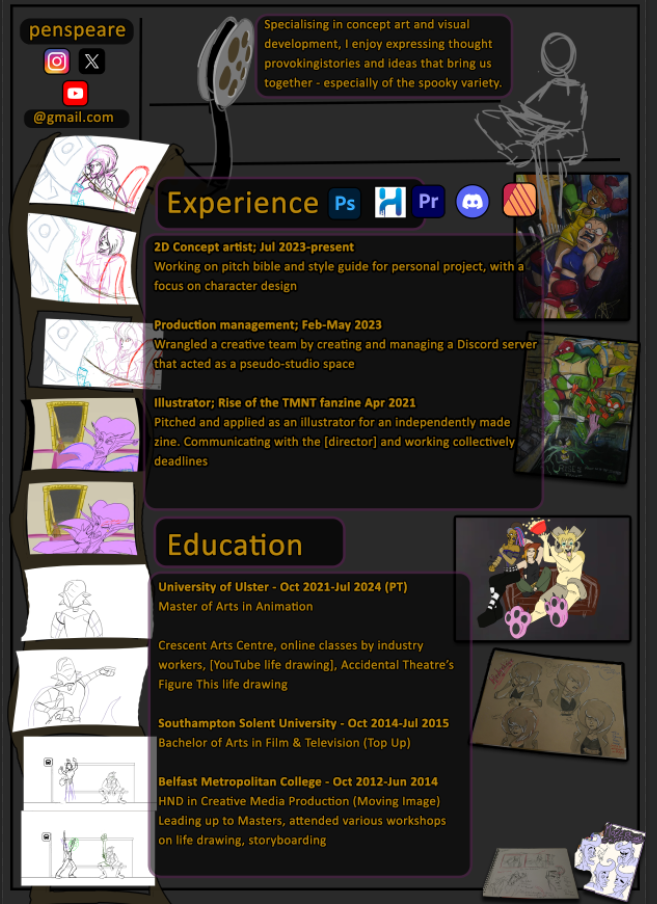
This is how it looks altogether so far. Still need to tidy up the film reel on the left, and finalise the actual text.

This doodle guy is supposed to a small, silly self-portrait, but it's not a high priority, so I may leave the scribble in as a placeholder for the hand in, and polish it up at some stage after. It's there for the idea of it anyway.

I'm a lot less sure of what I want to do in the bottom right corner though.

This looks a bit better. I'm not sure if the "wonky frame" translates as deliberate though.
I started asking for opinions on my creatives Discord server for some "market research"; it's always a good idea to have a different pair of eyes looking at something:


I still need to finalise a logo or banner that I will be incorporating into my socials but I have this as a placeholder for where my pseudonym or "title" goes on the CV.
Once it's finalised, it'll be on my website as well as a banner, then everything can tie in together and it can be recognisable that way.

It definitely still needs some sprucing up, but I like the direction it's going in. I like the sketchiness and "hands on" sort of vibe it gives off (aside from the doodled self-portrait at the side; that is very much a placeholder), which is something I would like to convey, as visual development and a concept artist, everything is very thumbnail and ideas based while working things out, and planning all those things.
Are there any legal requirements for a pen name?, Kiff. Via The Artist's J.D. Available at: https://theartistsjd.com/pen-name-legal-requirements/ [Accessed: 20/02/2024];
Don't make these animation portfolio mistakes, DanielMtl. 26th July via YouTube. Available at: https://www.youtube.com/watch?v=yYdFbxyxiwE [Accessed: 19/03/2023]
Conclusion
(Back to Navigation)
The final outcome for this assignment (Industry Facing Materials) is a PDF document of the CV, and is linked in the submissions page of Blackboard, alongside links to the relative blog posts, including this one. The Style Guide document goes hand-in-hand with it somewhat, as the document demonstrates my style as an artist and my specialist area as a visual development artist, or concept artist.
I definitely let this assignment go into the side lines quite a lot in favour of developing the art for the Style Guide, and the creation of it. That said, a great deal of that feeds into my online portfolio which is a part of my blog.
I was discussing with my mentor, Sarah, about the animator and artist CVs that I was researching, and how I noticed that a lot of them didn't have an introduction of sorts on their actual CV, but did on their Twitter or whatever social media platform they were posting it on. It all ties in together, and is a form of marketing yourself, as well as with sharing your work, your website and/or portfolio, and any showreel or individual videos either from YouTube or in GIF form.
I have all these socials connected with each other as well as on my website (and this blog that is dedicated specifically to animation)
References
(Back to Navigation)
3 Things I wish I knew as a BEGINNER "ANIMATOR", by KeshArt. 24th March 2023, via YouTube. Available at: https://www.youtube.com/watch?v=tmJp7xrsgsE [Accessed: 16/04/2024];
Your career in animation: How to survive and thrive, 2nd Ed. Levy, D. B. Allworth Press: New York, USA;
Exploring the Art Director Career Path: The Tasks, Salary, and Promotion Tips at Every Level, Open Door Creative 10th April 2022, via YouTube. Available at: https://www.youtube.com/watch?v=AvxV3wVsJHU [Accessed: 30/08/2023];
How to launch your art career in 2023 (seriously), Kelsey Rodriquez. 7th April 2022, via YouTube. Available at: https://www.youtube.com/watch?v=I6mbCPEtX8g [Accessed: 03/10/2023];
How to design a logo: step-by-step guide, via Blogspot. Begg, R. 13th October 2023. Available at: https://blog.hubspot.com/marketing/how-to-design-logo [Accessed: 29/10/2023];
Breaking into art direction, ;
The animation producer's handbook, ;
This Storyboard Advice Got Alex Hirsch His First Job, via YouTube, 31st January 2-24. Available at: https://www.youtube.com/watch?v=dIalg8NIDQk [Accessed: 13/02/2024];
Art Director (Animation) via Moon Workers. Available at: https://www.moonworkers.co.uk/job-description/art-director-animation#:~:text=Art%20directors%20are%20responsible%20for%20the%20visual%20style,the%20vision%20for%20the%20film%20or%20TV%20programme. [Accessed: 15/08/2023];
3 Principles to Improve Your Logo Design Process - Legibility, Hierarchy, and Contrast: https://www.youtube.com/watch?v=dBIq0KArHFE [Accessed: 26/07/2023];
The Difference Between Design & Art— How To Find Your Worth: https://www.youtube.com/watch?v=QOoRdbPdi0E [Accessed: 26/07/2023];


Comments