


Whatcha dooooin'? in yer Group Studio Project
- penspeare
- May 12, 2023
- 26 min read
(Assignment 01: Production Management: Group Studio Project)
There was a lot to write about in this, and a lot of overlap between different aspects of the project, but I have tried to organise it into their own sections as best I could into a table of contents so it's easier to navigate.
Contents
The Brief
Roles
General Group Work
Visual Development
Visual Effects Animatics and Animator
Some Quick Notes on Freelancing in Animation
The Brief


What to Do - Introduction to Module
A lot of this project has me thinking, "well this is certainly what wouldn't do during a studio based project", and to be a lot more assertive.
I like production management and organising things to make sure everything goes smoothly and according to plan. If the plan goes awry, there are back up plans in place because Murphy's Law exists and I am a perpetual worrier!
Made the Discord, researched studio roles so we have better direction... I'm happy enough to let people do their thing, but it definitely keeps my mind at ease knowing that there is some sort of plan in place. I worry about coming off as bossy or overstepping, but I think I just need to get over myself. It's important to have somebody who gets things organised, otherwise there would be complete chaos. I don't think anarchy really works very well for very long to be honest, but there is nothing wrong with keeping it a little lax, so long as there is still progress being made in an organised way.
Though I'll feel like I'm doing nothing, so I do want to take on an additional role that's a lot more active in the actual creation of our project that isn't just timesheets and paperwork. That said, and I'm adding this part at the end of the project, I noticed a lot of mentality where people felt they had to always be constantly actively be doing something, which was absolutely not the case. I definitely noticed during some stages with this attitude where things just halted for a bit because people were doing the same thing for some reason. Pretty much everybody in the group wants some sort of storyboarding and/or concept artist role which is something I was really wanting to do to be honest, but surely not everybody can do that, so I'm just gonna let the boyos snatch them up. I can work on those sorts of roles for my major project later on in the year; I honesty don't mind.
I did a lot of production management during my undergraduate degree in Film & Television/Moving Image (it was a top-up degree so it was a bit... convoluted? it was great though!).
Production Management
The role of a production manager, as I've stated above, is mainly organising and wrangling people together to make a project happen, and working out schedules (or, in this case, attempt to)
Observing and talking with people to see how they're getting on, if they're worried about anything, what they're happy with, etc.
Making sure things get done;
Organising people and meetings;
Figuring out what the group still needs to get done, and doing a run down of what we did each time we're working together
Everybody working on visual development and thumbnailing early on so we can get moving along
I need to work out exactly what each role should entail and discuss with the group so there is no confusion
I am the glue and it stresses me out (I brought this upon myself to be fair) but it stresses me out more not moving along; I don't really like sitting idly and unsure at the same time
Provide resources for the team that I think is useful to us:

Help everybody make their job easier, and therefore allow for smoother production of the project, at least as much as humanly possible, while still ensuring things get done. I adapted for a university assignment setting to remind people to do their blogs and to remember to put everything in regards to their process in those:
It's very, very frustrating posting queries or general announcements or pointers for them to be ignored, and then brought up by someone else about two weeks later as if it was never mentioned in the first place. Don't allow something like this to get to you though as, at the end of the day, the line between a "real" studio production and a university assignment, I think, comes into play here and it's acknowledging the difference between the two and, after which, allowing for a certain amount of leeway. I think I would need to aim to be a lot more assertive and less worried about coming off as "bossy" or "naggy" as, at the end of the day, in a "real" studio production, people will be hired for specific roles and will generally know what they need to do. It's a lot trickier in that regard for a university assignment, as I've found people often take it upon themselves to dip into other roles more.
A lot of this is trial and error for learning how to manage a production, and I do find I'm learning quite a lot about it in the process
I feel that, in terms of taking on the role of a production manager, a big part of that is also reeling things in. In other words, reminding the crew of our limitations and constraints and to ensure that they remember the type of project we are working on. I make sure to regularly remind people to take rests and breaks, and that they have other assignments to work on as well as this. And, as much as we would love to see a fully polished and completed project that, as long as we make the assignment essentials, we will be grand, and we can work on making it even prettier if time permits, but to ensure they are always working on their blogs and discussing their own individual roles because that is where they get their marks as we are all marked as individuals. It's tricky to maintain the balance because, despite being marked individually, there is certainly that element of wanting to make sure we don't look like we're slacking as I had a conversation with one of our crew members about this.


23/02/2023 - Production (Mis-)Management
Another point to note about the difference between a "real" studio and a "mock" studio environment is that roles can be quite tricky to work out, in the sense that in a "real" studio, people are specifically hired for specific roles. In this "mock" studio, we decided amongst ourselves, although multiple posts can be held as well as there being a lot of overlap with things, such as the ideation stage. Striking a good balance between putting our heads together for the project while also allowing each other to thrive in our roles has been... interesting. My insecurities of coming off as bossy or controlling have been played into quite a lot, but I feel I need to communicate that as well, which I do for the most part, by voicing it and also trying to make sure to let people know if they've any worries to please please bring them up, whether in the discord server channels, or private messaging me. A huge part of the group project assignment is needing everybody to co-operate with, well, everybody on the team, which can be more difficult than you originally think
I think it might be a good idea to take the initiative here (something I probably should have done sooner, to be honest, so that's my fault) is to message everybody individually to see how they're getting on. I was taking a more passive approach to it originally by posting messages in the discord server channels to say that people can private message me if they're more comfortable with it. However, nobody did, so now I'm thinking I should do it myself. Again, a big part of the group assignment is not only communication but - though I don't think you can really have this without the other - is co-operation, and I may as well go ahead and make the first move in that sense. It allows people to respond in their own time, and doesn't necessarily pressure them into a corner to respond at all (I hope), but I do want to consider exactly how to go about it and work out what I need to say to each person. Part of me worries that it almost looks like tutorials with a lecturer and I don't want people thinking things like, "wow, who does she think she is?", but it is what it is, and if it helps even one person, then that's awesome. Also, I suppose this is really part of the role, right? It's also something that every job does - or at least should do - is have "PDR"s, individual meetings that are separate from the big group meetings with every staff member to see if they have any worries, what changes they want to see being made, what they like, or if they have any suggestions moving forward


This also feels like a very "I'm doing absolutely" nothing job, which I've voiced to a few people, but I've been re-assured that it would be missed if it wasn't there. My book, David B. Levy's Your career in animation: How to survive and thrive has helped with this as well in the Designing a Career Part II: Writers, Directors, and Producers (pictured above) section where it is discussed how there is actually quite a lot of multi-tasking, and observing through the entire production.
Working out how to navigate people can be tricky as well, as certain approaches don't work for everybody, and sometimes you need to be quite careful and delicate around things that you might not even otherwise consider to be an issue, but it may be quite sensitive to others. As my book also discusses, you need to keep up a good work culture within the team and making sure to praise people every step of the way to keep morale up. I did this (and so did everybody else which I noticed) by responding to posts of works in progress pieces with positive re-enforcement such as "that looks awesome" or "I love this!", etc.
Scheduling and Time Management
This section bleeds in a little bit with the pipeline too. I tried putting together a table of everybody's interests and availabilities so we could work out who was going to do what and how much they were realistically able to do each week. I then took it over to a specific channel on our Discord server where everybody had their own threads to post their weekly availability (that only I seemed to update every week BUT ANYWAY), so an attempt was made.


The intended idea was so that people would post their availabilities each week (without needing to get super specific; all we needed to know is what is doable for each individual), so I made individual threads for everybody to post in. I posted my work rota every week to show when I wasn't free, or the hours that I was and was not available. There wasn't much response, if any, so trying to make a more rigid schedule was very difficult.
On the one hand, just making one whether people liked it or not based on the information that was given could have been the better option but, realistically, remembering the nature of the type of studio project we're enduring is necessary. That is to say, this is a mock studio being undertaken in a university environment, and so the project isn't the only commitment everyone has going on (I wish my area manager in work demonstrated this understanding but anyway), so I wanted to strike a balance between taking the project seriously enough so that progress is made, but not so seriously that it's the only thing in every person's lives that matters.
We took on a very, very loose to do list of sorts, so there is a lot of trust in everybody doing their own individual work, which is fine as everyone has demonstrated they can get work done, both well and quickly, although waiting until the last minute to respond is incredibly frustrating; something that shouldn't really fly under a more professional setting, especially due to the ripple effect it has on the rest of the group or studio.
General Group Roles
Visual Development
I felt we were stagnating as a group a little bit, so I went ahead and start visual development. I don't like feeling as though I'm stepping on people's toes, but at the same time, the ball needs to get rolling because it all has a ripple effect and, from a production management perspective, I was making observations and chatting to people, and I could tell there were slight frustrations about wanting to get on with work, and I get that.
One of my favourite phrases to spout is, "you can't build sand castles without shovelling sand into the sandbox first", as it reminds us that we can't make glorious things without throwing ideas out there first. That said, it's good to know what sort of sandbox we need first. I was nagging a little bit the first week that we needed to actually watch some existing shows and promotional videos so we had some foundation to go from. There's nothing worse than churning out great ideas to then realise they go against the brief. So, as a group, it was decided during the second week that we take a look at shows with a similar concept.
Analysing media texts that relate in some way to the project:


Visual Effects
It's nice to have somewhere to start with visual effects; I always wanted to get some practice in, but never had enough gumption or motivation to work it into something (excuses, excuses), but a sci-fi based project is definitely a good shout for somewhere to start!
Looking at Helluva Boss examples as as well as Tron examples as both inspiration (particularly with Tron) and insight into how much visual effects can really make an animation pop
Drawing up a brainstorm board with a script breakdown to figure out what we need to do for the 2D effects. Granted, we may not necessarily get to this stage as this is only a "mock" studio environment, however, I think it's a great idea to explore the role and get some practice for it in regardless


The visual effects team, with all good intentions, was disbanded or fizzled out. Everybody took on some sort of animation task eventually, so we'll swiftly move on to the next section.
Animatics and Animation Person
Using Toon Boom Harmony to create the animatics
Nothing like realising there are mistakes or miscommunications in the storyboards until you start creating breakdowns for the animatics!
Let's have a look at the storyboards here:

As a production manager... I asked Eoin to send in a digital version as I could not read it but, apart from that, cool stuff. This is what I got:

As a production manager who needs to work a day job... I often find that I've come home from 11 hour shifts and then that's when there are lots of messages in the discord server, or at very late hours of the night, so sometimes I would skim through to get the gist of what's been posted, want to say something, but it's late then I forget, then I don't have the brain power to process it later on. That is my bad, and my problem that I need to work on. Then working out how to bring up an issue that doesn't sound mean. I worry far too much over how I come across to be honest, at my own detriment. If people are nice and trying their best, I worry more about it, but anyway. Notice how there are no stage directions; bear this in mind for later, as it's interesting regarding communication between departments when pieces of work are moved around as we go down the pipeline.
I compiled them into smaller sets; I went ahead and did it myself as I felt that the opportunity to say something had past, plus I felt I was doing nothing, so here we go:


To be honest, because there were no stage directions, when we sat down to do a breakdown for visual effects, we were trying to work out what was going on between scenes 3-5 on page 2. I thought Darkstar was hit by a rock via Riley's hockey stick tennis-style, but then they couldn't have been because Zack was still holding the rock in the next scene. It took me ages to work out that Darkstar was just getting into position to charge at the two kids. We worked it out eventually, but this was a bit of a miscommunication.
For fun, here are two more examples of miscommunications where the original person may think something is obvious, but it isn't to the next lot of people the work is passed on to:
The storyboards stated "the audience take off", with the intended meaning being "enthusiastically applaud" or some such, but the animators took it very literally, but because the studio thought it was so funny, they left it in. Happy accident, in this case! But it does go to show, especially between different departments and especially if they are located on different parts of the globe, that clear and concise communication is extremely important.
Myself and one other person are on the animatics team; said person actually came around to speak to me verbally about it and, from a production management point of view, I made sure to thank them for responding.
I need to keep referencing the model sheets so I know what the characters look like from all angles.
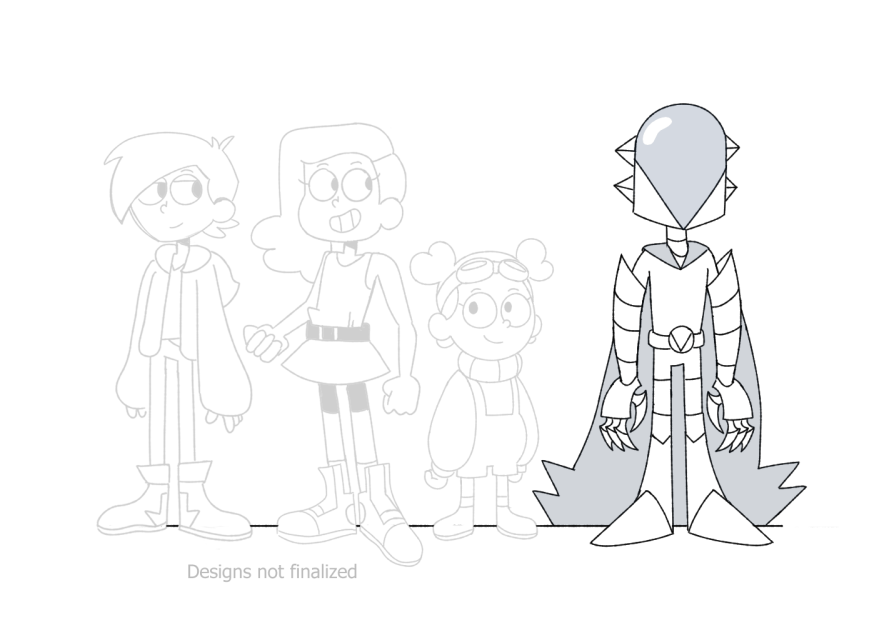


More references for hockey skaters to help with Riley's walk/roller/movement cycle

I'm learning how to animate a camera in Toon Boom this way, so that's good. Like many jobs, I am learning as I go and as I need certain things.

This hurts my head to look at. Just going by what's dictated in the storyboards, I'm playing around with the camera animation feature in Toon Boom to create a zoom camera direction. I like the first zoom enough, but the second one is... a bit yikes.

Niall is the client. Centre of balance is off in the animatic (I agree; need to work on the pose quite a bit), so I need to make some adjustments here. He has helpfully given me a great example of other media that contains a similar shot or pose as a point of reference to help improve what I'm working on.
After our client meeting (talk about this in the production manager role bit of this blog; he think I'm doing a "top notch job" which I was fluffin' my feathers over, lol), he mentioned perhaps just
Darkstar "battle ready" shot Gonna look at some Jojo for reference inspiration as well. That show is always a fun one for framing and poses!
Need to pinch a motorcycle helmet off somebody to take some photo references

Working on the shot of Darkstar winding up a punch or getting "battle ready", and I'm figuring out the framing of it. Looking into the "golden ratio" for better blocking out for the shot so it's more dynamic looking and aesthetically pleasing.


Needs to be a lot more dramatic. Having a spot of bother getting the helmet drawn at the perfect angle.


Rock's a bit janky near the end, but I like it otherwise

Haven't actually animated the two characters just yet, but I'm happy enough with how the "action" lines in the background have come out for the time being.

Only applied the camera animation to Darkstar to make sure it was working out okay and to test it out; it's fine, albeit a little fast but nothing I can't fix easily enough. I also need to resize Riley and Zack (and the rock), but surprisingly and annoyingly, I've been running into a spot of bother trying to get Toon Boom to actually allow me to apply the change to both the separate layers and the individual drawings that I've already animated.
Anyway, I'm gonna stop working on this one as I was just told that it's been cut, so no point in wasting any more time on it.
Found out, as of Monday night (27th March) that it had been decided outside of the group by the art director that moving on to the actual animation side of things would simply go forward. All right. To be honest, I was ready to bring up the point of the animatics easily bleeding into animation, especially given this is a university assignment with a tight deadline, so it's not the worst news in the world. Tried to nab a couple of the shots I was already working on because abandoning one thing and starting a new thing (especially when I need to focus on other things) is frustrating.
Anyway, animation person time. Let's look at the dynamic shot of Darkstar

I need some references. I'm gonna look at some animation examples to see how they did this.
I may have to locate a motorcycle helmet and take some first-hand reference photos so I can get the exact pose and movement I'm after then, of course, push it further to give it some exaggeration .
Not quite what I'm looking for in terms for the exact pose, but it's good to look at for research as it's part of the brief prompt in terms of the type of related media and audience demographic we are working towards.
Some interesting dynamic, and also rather dramatic, single shot "battle ready" poses

Nobody has a motorbike helmet... I may have to get a balaclava or snood thing, then amend it, oh dear. Just for the blog though and my own personal reference for this shot!
[Insert some examples of animators going the extra mile and recording themselves as references. The 2009 film 9 does this]

I did the pose the wrong way around, so I just threw the footage into Premiere Pro and flipped it horizontally. Real life references make everything so much easier to animate. I also couldn't find any motorbike helmets (and I was not spending £80 odd on one from Amazon just for a 2 second odd shot, if even)

I might hold the final pose a bit, and maybe add a bit more anticipation right at the start. A smear near the end where Darkstar pulls their fist out as well would be beneficial. Watching the video back, I did see some blurs around there anyway.

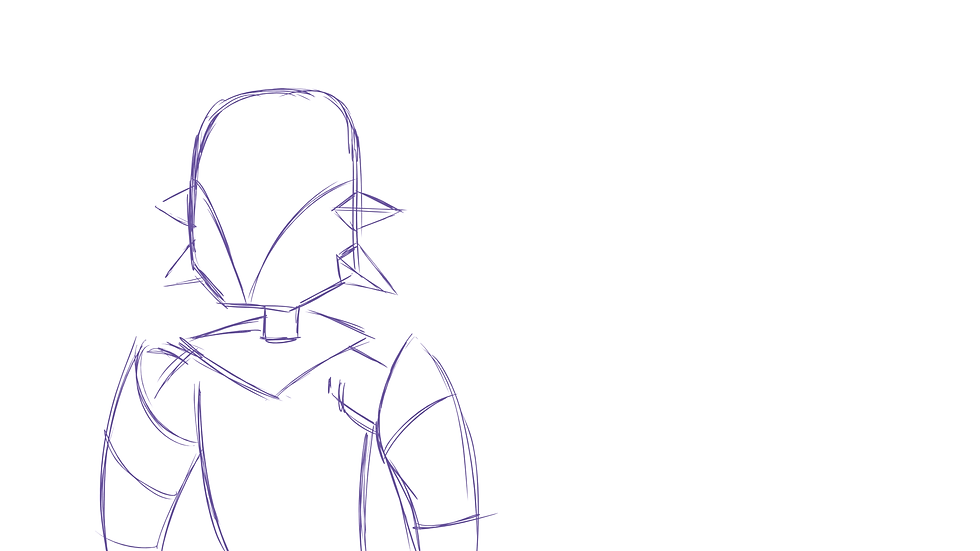
Use of arcs, especially in the head
Holding the pose
Anticipation
[reference your animation books for this too!]

The punch lands perfectly in the golden ratio!
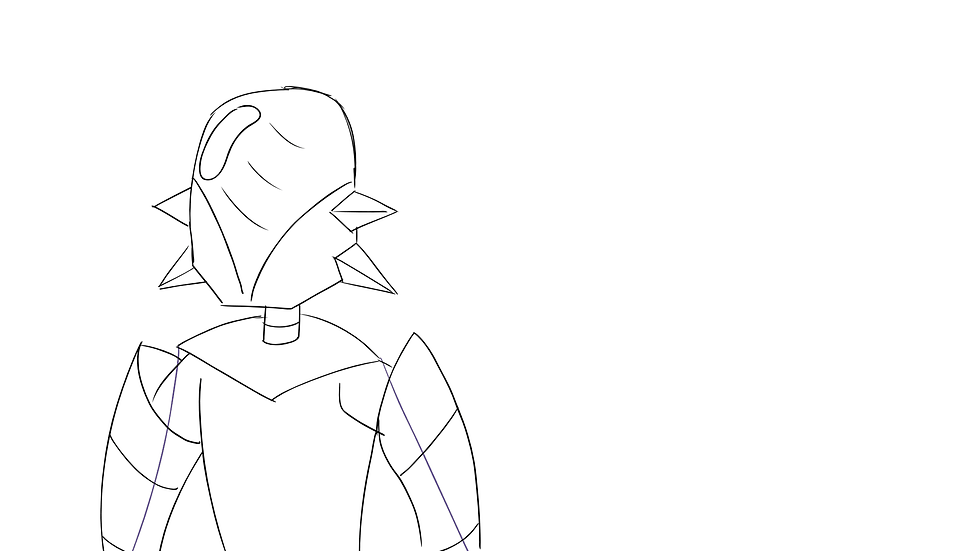
I am loving how they turned out. Bit messy with the lines, and I want to add a shimmer or a gleam to their helmet as they hold the final pose, but we'll see what they say.

Lines are pretty messy, but I'm content enough with it. Technically, I suppose it would be sent to a clean up artist for that, but we are a small team with an even smaller deadline and pipeline.

Suggested by our client/mentor, Niall.
I love how there's barely any actual animation of them skating, especially from the side (which, in fairness, as Niall pointed out, you typically don't really animate from the side anyway; you would tend towards more three quarter views to add depth for one thing), or full body shots! And, if there were full body shots, they'd essentially just be gliding from one part of the screen to the other. It's actually quite funny to see it play out like that.
One of the duties or responsibilities involved in creating the animation is to ensure you are constantly referring back to the model sheets as well as the storyboards. Additionally, looking up references (or creating your own!)
Insert a video interview from Nickelodeon's YouTube about an animator who didn't get a position as an animator on Cartoon Network's series Teen Titans Go! because he was too on model in his animation test. Some shows want you to go off model a lot, and this is evidenced in Cartoon Network's Steven Universe, a storyboard driven show, where you can even tell who boarded what episode because the style would differ in a certain direction in style!
[Add examples of what you mean!]
In Helluva Boss, you can tell different animators animated different shots in the same scene. It is very difficult to match up characters within the same scene when different animators - particularly when they are scattered all over the world - are working on many short shots within the same scene. I'm not criticising it by any means; I find it quite endearing at times. I like human it makes it
Example of independent animated productions:
(In case the embedded timestamp doesn't work, it's 10 minutes, 54 seconds that I'm talking about in particular here)
A lot of the shots in the argument between Blitzo and Loona go quite off model, and I think this is an instance where there were different animators working within the same lines of dialogue let alone the same scene. The height differences alone within the same character is interesting to see! Throughout the episode as well, you notice that the length of (human) Loona's outfit varies a fair bit.
I'm trying to find some examples of how other existing cartoons, particularly from the same network (Cartoon Network) as described in the brief, execute the types of animations I'm trying to perform.
This one is for the charge scene. Riley is skating, but then I also need some inspiration and examples for Zach moving his arms as he's running, despite his legs not being within the frame.

It's messy, but it's getting there. Some of them have been cut off due to the framing, but I add notes and annotations to my work as I go along so I know what I need to do, what I need to fix, what I think may be working so far. Then the mechanical looking arm on Zach is to give me an idea of where his arm is travelling as he runs.

This is so funny, but not in a good way. It is getting there though; slowly but surely! I need to play around with his jacket fluttering in the wind as he's running. I'm having a spot of bother with keeping his head on model. I think I could have used with a couple of more variants of his head in different positions or angles on the model sheet, but I'm working around it.


I need to put in either an in-between or an animation smear for when Riley switches the position of her legs. I added colour-coded washes to the characters just so it was easier for me to see them while animating. It can get a little tricky the longer I'm looking at it, so differentiating them as well as the different parts that move help a lot (hence the hockey stick and wheels being a different, colour, or different layers... I'm probably making some of it more difficult for myself in some ways, but it's all a learning process with a lot of trial and error, and learning why you do the things you need to do, sometimes the hard way!).
Rectifying Issues
Oops, just posted my WIP to the discord server and I was reminded we changed the shot to both of them being framed as a mid-shot instead of just Zach. My head is a sieve. Production management note: when compiling minutes, maybe consider organising them for specific tasks so they are easier to reference back to, especially with seemingly smaller things.
I went back to the "Help and Tips" channel of our group's discord server as I had a spot of bother with resizing multiple drawings and layers in Toon Boom simultaneously, and Niall, our mentor and "client", mentioned that I needed to attach a peg to them.

I have never utilised the peg feature in Toon Boom before, but now it's necessary. The very first two sentences from this screenshot is exactly why I need to use it now.

(Clicked the little curvy icon to make "parent pegs" for each of my layers)
I ended up asking our art director to show me how to do it, which he did on his version of Toon Boom, and then I promptly forgot how he did it. It's not the end of the world if I don't apply it to this shot in the end, but it's simple enough to do from what I saw, but with things like this for future reference, I'm going to do a few little exercises in Toon Boom after to get myself used to all the hidden useful tools.
I had to put the shot away for a while because I was getting really frustrated with it (happened a lot with this shot in general, actually), but I came back to it to clean up the lines.

Zach is absolutely fine, but Riley... oh dear. I like how her roller blades turned out, but I need to fix the torso; it's a little tragic looking as of right now. I need to add in her hair, so that will add a spot of overlapping action and follow-through to it as well, but she is, overall, incredibly jerky. While I was animating her, I couldn't see it too well until I watched it back properly. I thought moving her torso was a good idea, although she probably needs a couple of in-betweens or animation smears - also where her legs switch places, although I need to resize he characters or reframe them so it's more of a mid-shot, so I'm not viewing that as particularly urgent - so her movement is a lot cleaner.
Because everybody animated at least a shot, consistency was a bit... not great, though watching a rough cut of everything together, it didn't look too bad. Although the shot directly after this one has Riley's movements completely different with how she swings her arm, so now I'm in the position where I have to change it lest it look very, very odd.
I ran out of time to properly fix it as that would have taken a while, but on one, I suppose that's one of the issues to think about when there are so many people animating such short shots and so close together. Better communication needs to be had to prevent problems like this, or pointing it out and coming to a middle ground where there is less re-work done, although that is, and as our mentor Niall pointed out in a few of our meetings when talking of his own previous projects, the nature of the game sometimes.
Pipeline
A pipeline is "an ordered set of tasks that people undertake to complete an animated film for an animation client."


We had a bit of an unconventional pipeline, with a more casual approach, but it did, for the most part, work out for us and kept us all productive. As a task for the production manager, I organised the discord server with each stage having their own sections, as well as a "general" channel, as I discussed up in the Production Management section of this blog post.
Working out a pipeline is actually quite difficult, especially considering the nature of the project in that it is not the only [thing] people are doing in their lives. It also makes it more difficult when trying to work out everybody's availabilities when they don't always respond, or cancel just before an arranged meeting or the like, especially when it's asked repeatedly. It can get quite frustrating and has a ripple effect on everybody else, but we're all the mercy of each other. In a "real" studio, I feel it would be more the case that the crew are working around an already set schedule, and it's an otherwise "too bad" case. Goal lists for the week are a lot easier to manage with people, and it also puts a little less pressure on everybody and they can better work around it with everything else going on in their lives.
That said, our Discord server was generally quite active and up to date, with people asking how they were getting on with their work, and posting works in progress and the like, giving each other an idea of where we were. Ultimately, we were working towards our end deadline, and having bi-weekly or fortnightly meetings with our mentor or "client", Niall which, also as a production manager, I took "minutes" for and would post them into the relative sections of our Discord server. The feedback we got from those meetings we would then discuss as a group, and then aim for certain milestones for the next meeting with the client.
Some Quick Notes on Freelancing in Animation
These are more notes from our lecture in freelancing in animation, but I tried to apply some of it to this, and to my own general interests. I thought I would keep it included in its own little section so I can easily reference back to it.
Communication is key in a collaborative environment, and honesty is incredibly important as well. Ask loads of questions, and understand that the first few weeks - or even months, more likely - will be tough as you find your footing** Particularly difficult in a mock studio setting, as there is uncertainty of how things are executed, as well as the extremely tight deadline.
Own up to mistakes; communicate as quickly as possibly and ask questions. This is how you learn, and ties in with honesty as well
Set boundaries - communicate, and know that you can walk away if it's not working out. Know your limits, and be aware of burn out I did give up a bit after a while with trying to wrangle on the production side of things. It got incredibly frustrating not being listened to or not being responded to. At the end of the day, everybody - myself included - have other things to be getting on with, inside and outside university, plus we're all marked on this individually, so I will reference my personal favourite phrase: "not my circus, not my monkeys".
Keep developing your own practice I still have picked up a lot of production management skills or development in undergoing this assignment. As I was discussing with Sarah during one of my one-on-one tutorials, Discord is used quite a lot in "actual" studios where they wrangle crew members from quite literally all over the world, and utilising the voice chat features and the like and, especially from during the pandemic, it has changed the way animation productions work and in a good and more accessible way. So, essentially, it was a great way to start to come to grips with it, and become more familiarised with how things work in a more relaxed and forgiving environment. Limited Experience
Keep networking and communicate and try to attend festivals and the like to get involved
Keep up to date with industry developments. Build your confidence, and hone you skills and specialisms
Effort and perseverance - keep going! I find that this project, particularly in terms of production management, is perfect when you have limited experience in the field, as it allows so much room and comfort for working things out through trial and error, through hindsight, etc. as it is all designed to be a learning experience for when we do go out in the big, bad world. I have certainly picked up a few things, and a lot of "I would do this differently, though" or "I would apply myself a lot more in this area" moments.
Dublin is very high up in where you should be for animation. It's ranked number 4 after the USA, Canada, and France. Dublin is very expensive to live, and is worse than London (particularly after Brexit) to the point where new graduates and students were camping. Some people live in Belfast and commute to Dublin, but also have the option of living at home, making it a lot cheaper and accessible that way
Finland is big for video games apparently!
Since COVID, flexibility has increased, and so has potential for work all over the world from the comfort of your own home. Discord is a fantastic tool for organising this From engaging with artists on Twitter, I have learned that a lot of independent studio in particular will use Discord to organise their productions and keep in contact, so getting used to a "Discord indie studio", such as Spindel Horse, environment, even if it is quite casual or informal, is quite beneficial.
That said, the time zones make things very difficult, making communication quite tricky, but it's also a lot cheaper for both sides and all round
Need to build up a lot of trust and rapport from companies and individuals Pricing
Hardware, software, cost of living
Tax
Job security isn't great due to the project-based nature of freelancing. You could have a lot of work for X amount of months, and then absolutely nothing for a while, so do be prepared for the poor structuring. It's either feast or famine and not a lot of balance.
Teaching is a bit safer and gives you at least some steady income (but, of course, go into teaching if you actually, genuinely want to go into it)
Once you've earned over £1000, you must register with HMRC and obtain a UTR, so you can fill out the forms. You can hire an accountant, who are generally very much worth the money. The tax penalties and fines are not worth the headache (you can offset the accountant's bill from the tax)
Some freelance jobs will require you to have a UTR before you start your contract, and it is completely your own responsibility. It doesn't come out of your pay automatically; you must do it yourself. A good idea is to put this money away from your main account every month so it doesn't get spent
Even though the tax year is April-April, you have to pay it by the start of January, otherwise late fines will be issued to you and will increase the longer you don't stay on top of it. Even if it's less than a penny, it will add up!!
Be smart about it...but don't be getting accused of money laundering
Reflection and Peer Review
What happened?
What should have happened?
What would you do differently?
What did you learn?
A lot of trial and error and how, and how not, to run a studio production while in various roles. It's very eye-opening too, but definitely a really important and valuable learning exercise in growing an organisational skillset to take over to the "real world". As it is an emulation of a studio production, it is tailored to work within an academic assignment so, of course, there will be plenty of leniencies and some differences regarding how an "actual" studio production would be executed but, as I mentioned, there are plenty of adaptable skills picked up and learned through the trial and error of this opportunity, where there are less "risks" or, I suppose, dire consequences. For example, we potentially have opportunity to polish up the pieces from our project to insert into our showreels, whereas an "actual" production, we don't.
I think I've covered a lot of my reflection all throughout this blog, especially of what I would do differently next time, but generally speaking there has been a lot of trial and error, especially with communication, and I would absolutely be a lot more assertive when trying to get answers from people and, if they don't reply, that's too bad, and going ahead with a more rigid set of goals. That said, as much as I have bemoaned all throughout this blog that nobody would answer me, everybody did an absolutely smashing job and I found there was generally a good rapport amongst peers.
Any issues were brought up quite quickly and voiced, and they were quickly sorted out, and everybody was generally happy and got on with things. There were a few instances though where I felt I was dismissed or brushed off by one or two people in particular, for what I said to be brought up later or by our lecturer which, on the one hand, I felt validated but on the other, found it a little hurtful at best and felt as though I was seen as stupid, but I just got over it. If anything bothered me that much, I'd just step away for a bit and get on with my own tasks. Again, generally speaking, everyone was good.
Here's a signing stream of VivziePop and Brandon Rogers where, in the middle and near the end of the video, they discuss the trial and error of working on independent but professionally made animated shows, and how the learning curves can fluctuate and how they are always learning new things about the animation process. For example, how the animators need to know what objects look like from various angles so they are able to draw them.
Available at: https://www.youtube.com/watch?v=oXgIyBN3hnE
References
14 Positions in an Animation Studio you should Hire via Business of Animation. Available at: https://businessofanimation.com/14-positions-in-an-animation-studio-you-should-hire/ [Accessed: 02/02/2023];
Job Profiles via Screen Skills. Available at: https://www.screenskills.com/job-profiles/browse/animation/ [Accessed: 02/02/2023];
Levy, D. B., 2021. Your career in animation: How to survive and thrive, 2nd Ed. Allworth Press: New York;
35 Types of Jobs in Animation, mewTripled via YouTube.14th October 2021. Available at: https://www.youtube.com/watch?v=BO7IaOW-8kE [Accessed: 02/02/2023]
The Studio Roles you Need via Start a Studio. Available at: https://startastudio.com/the-studio-roles-you-need/ [Accessed: 02/02/2023];
Available at: https://www.youtube.com/watch?v=OFIwLVy5gA0 [Accessed: 27/02/2023];
How to position and animate the camera, via Toon Boom Harmony. Available at: https://docs.toonboom.com/help/harmony-20/essentials/getting-started/camera.html [Accessed: 16/03/2023]
Available at: https://www.youtube.com/watch?v=vuhKV5CLLVk [Accessed: 23/02/2023];
Available at: https://www.youtube.com/watch?v=yJqqf18WAzE [Accessed: 23/02/2023];
Available at: https://www.youtube.com/watch?v=2zhVGJtG6UE [Accessed: 04/03/2023];
Available at: https://idfive.com/agency/insights/instantly-improve-brand-designs-golden-ratio/ [Accessed: 20/03/2023];
Available at: https://www.deviantart.com/theposearchives/art/Male-with-Staff-Battle-Ready-Pose-879637086 [Accessed: 20/03/2023];
Available at: https://boords.com/animatic [Accessed: 25/03/2023];
Available at: https://thejapingape.blogspot.com/2018/03/40-best-collections-drawing-punch-pose.html [Accessed: 30/03/2023];
Available at: https://www.youtube.com/watch?v=BTLkDnsmnQU&t=631s [Accessed: 30/03/2023];
Available at: https://docs.toonboom.com/help/harmony-21/premium/rigging/add-peg.html [Accessed: 13/04/2023];
Available at: [Accessed: 09/05/2023];
Available at: https://www.youtube.com/watch?v=IJ7HahlojX0 [Accessed: 10/05/2023]
[Get your books on making short films]


Comments